01
Where did the market do business?
OFL VBP, the NinjaTrader volume profile indicator, maps volume by price, high- and low-volume areas, and the volume point of control.

NinjaTrader 8 indicators · native NinjaScript add-ons
See who is aggressive, trapped, or absorbing. Order flow indicators for NinjaTrader 8 that turn footprint data into one readable visual, plus a volume delta indicator, NinjaTrader volume profile, liquidity zones, exhaustion, and pre-open structure—20+ native NT8 indicators running on the data feed you already use.


The value
Another NinjaTrader indicator is only useful if it makes a decision clearer. OFL organizes the NinjaTrader 8 workspace around structure first, then the order flow reaction at that structure.
OFL VBP, the NinjaTrader volume profile indicator, maps volume by price, high- and low-volume areas, and the volume point of control.
Delta Map, the volume delta indicator for NinjaTrader, translates ask-versus-bid footprint data into a cleaner visual read of buying and selling aggression—so you are not decoding a footprint chart cell by cell.
Dominator evaluates trade pace and size against the activity normally seen at that point in the session.
EAD marks exhaustion and absorption as aggressive momentum starts to fade.
Liquidity Zones highlights areas where passive participants absorbed aggression and traders may be trapped.
Job Pivots and AutoPlot automate structural reference levels so preparation does not start with a blank chart.
See the mechanism
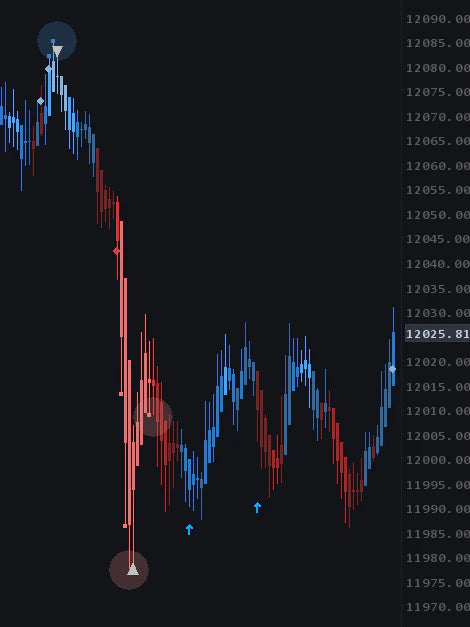
Volume delta indicator · Delta Map
Delta Map surfaces buying and selling dominance, exhaustion, and absorption from footprint data without asking you to decode a wall of numbers at full speed.
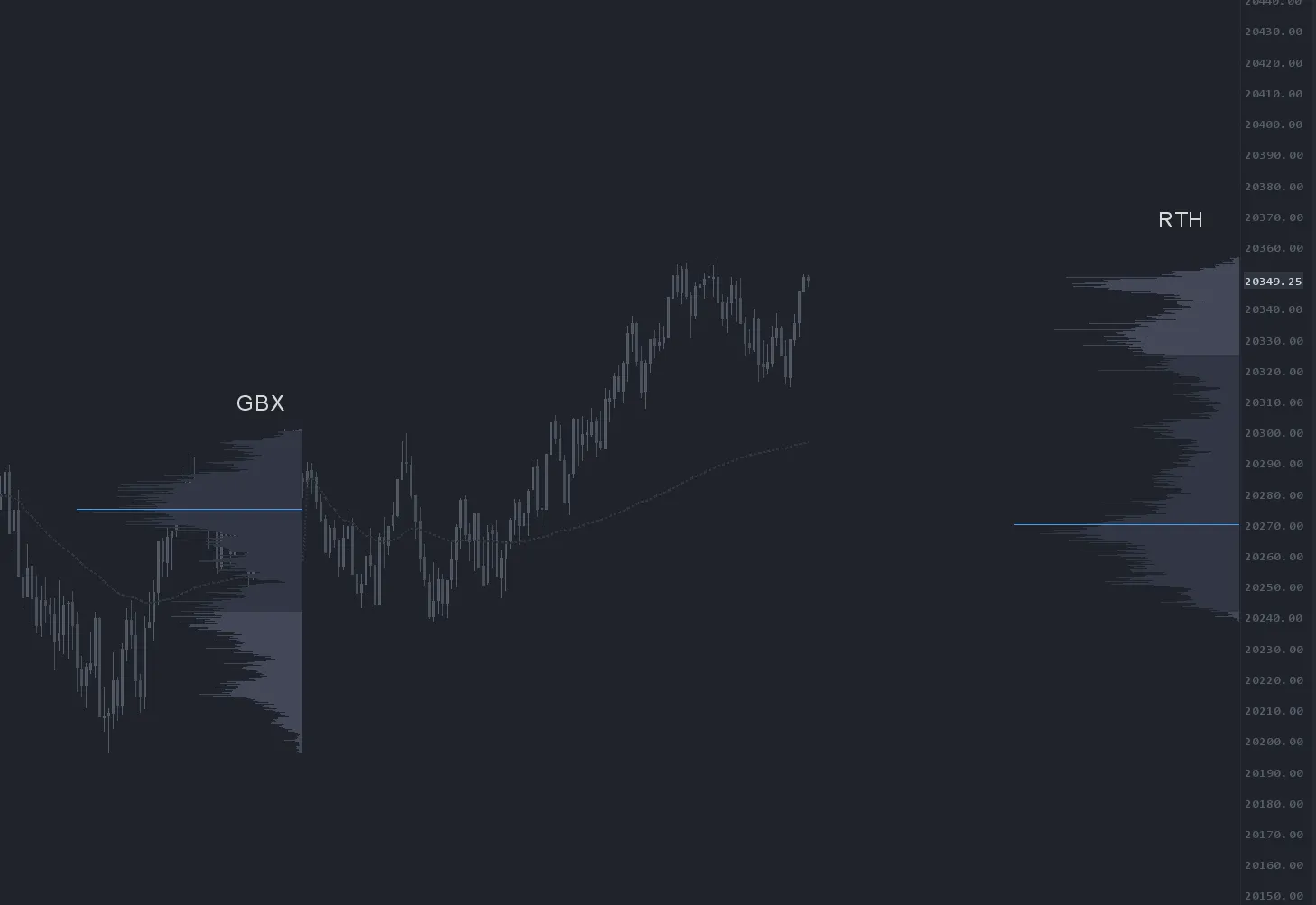
NinjaTrader volume profile · OFL VBP
OFL VBP plots traded volume at price with configurable profiles, delta mode, swing anchors, and VWAP overlays inside NinjaTrader.

Absorption · EAD
The Exhaustion and Absorption Detector adds context at the level you planned. It is evidence to evaluate—not a signal or a promise of the next move.
Built for your existing setup
The OFL installer puts every indicator, template, and workspace file in the right place automatically. With a live data connection already configured, you can go from zero to trading in about five minutes.
The credibility
A screenshot can show what an indicator draws. It cannot tell you whether that read belongs in your process. That is why the demo, public reviews, and transparent renewal all sit before the purchase.
So much of my chart has been automated by OFL studies I now can't trade without it.
Disclaimer: Testimonials are not indicative of future performance or success.
~$99/mo for 3 months of the full Order Flow Suite.
Renews at $659/quarter — less than 35 NQ points. Cancel anytime before renewal from your account, in Discord, or by email. No retention call, no hoops.
One month, no commitment.
Renews at $249/month — less than 15 NQ points. Cancel anytime from your account, in Discord, or by email. No retention call, no hoops.
$199 buys one month. $299 buys three. Same suite either way.
Need a different platform? Choose your edition.
Our commitment. We have a 4.9 Google Rating because we highly value customer satisfaction. If you're unhappy with our tools for any reason, please contact support to discuss.
Trading tools provide information and context, not guaranteed trading outcomes.
The offer
One membership puts the indicator stack, pre-built workspace, market preparation, live chart stream, setup help, and member room behind the same NT8 workflow.
The fine print, up front
Yes. OFL’s NT8 indicators are built in C# and run inside NinjaTrader rather than through a bridge to another application. Installation is handled by the OFL script: run it, choose NinjaTrader, click Install, and restart NT8. The indicators, templates, and workspace are placed automatically.
No separate OFL data subscription is required. The indicators use the market data already reaching NinjaTrader through your broker, prop firm, or data connection. Your connection still needs to supply the bid/ask and tick data required by the order-flow tools you use.
No. OFL produces the required order-flow information in-house. You do not need a NinjaTrader Lifetime License or a separate Order Flow+ subscription to run the OFL tools. You only need NinjaTrader 8 and a live data connection.
Yes. Many OFL members trade funded accounts through firms such as Lucid and Tradeify. The tools install into NinjaTrader and use the live data connection already attached to that setup.
Not a traditional one. Delta Map is a visual representation of footprint data—the ask-versus-bid volume delta at each price—drawn so you can read aggression, exhaustion, and absorption without watching a footprint chart cell by cell. It simplifies the flow of information rather than adding another grid of numbers.
The quarterly plan renews automatically at $659/quarter unless you cancel before renewal. Cancel from your OFL account, through the Discord help desk, or by emailing support. There is no retention call.
We have a 4.9 Google Rating because we highly value customer satisfaction. If you're unhappy with our tools for any reason, please contact support to discuss.
You can cancel anytime from your account, keep access through the end of your billing period, and the free tools stay free.
NinjaTrader 8 desktop and the native NT8 edition are intended for Windows. If you need a Mac-compatible platform, select MotiveWave or EdgeProX in the offer above. The same OFL membership is available for Sierra Chart as well.